
How to Use the Roomvo Visualizer

Choosing hardwood flooring is a big decision—and seeing it in your own space makes all the difference. The Roomvo Visualizer lets you preview Sheoga Hardwood Flooring in real rooms, using either one of our sample spaces or a photo of your own home.

With Roomvo, you can explore different wood species, widths, grades, and finishes, rotate plank direction, compare options side by side, and visualize how your flooring will look before you buy.

This guide walks you through how to use the Roomvo Visualizer step by step, plus highlights the key features that help you make confident flooring decisions.
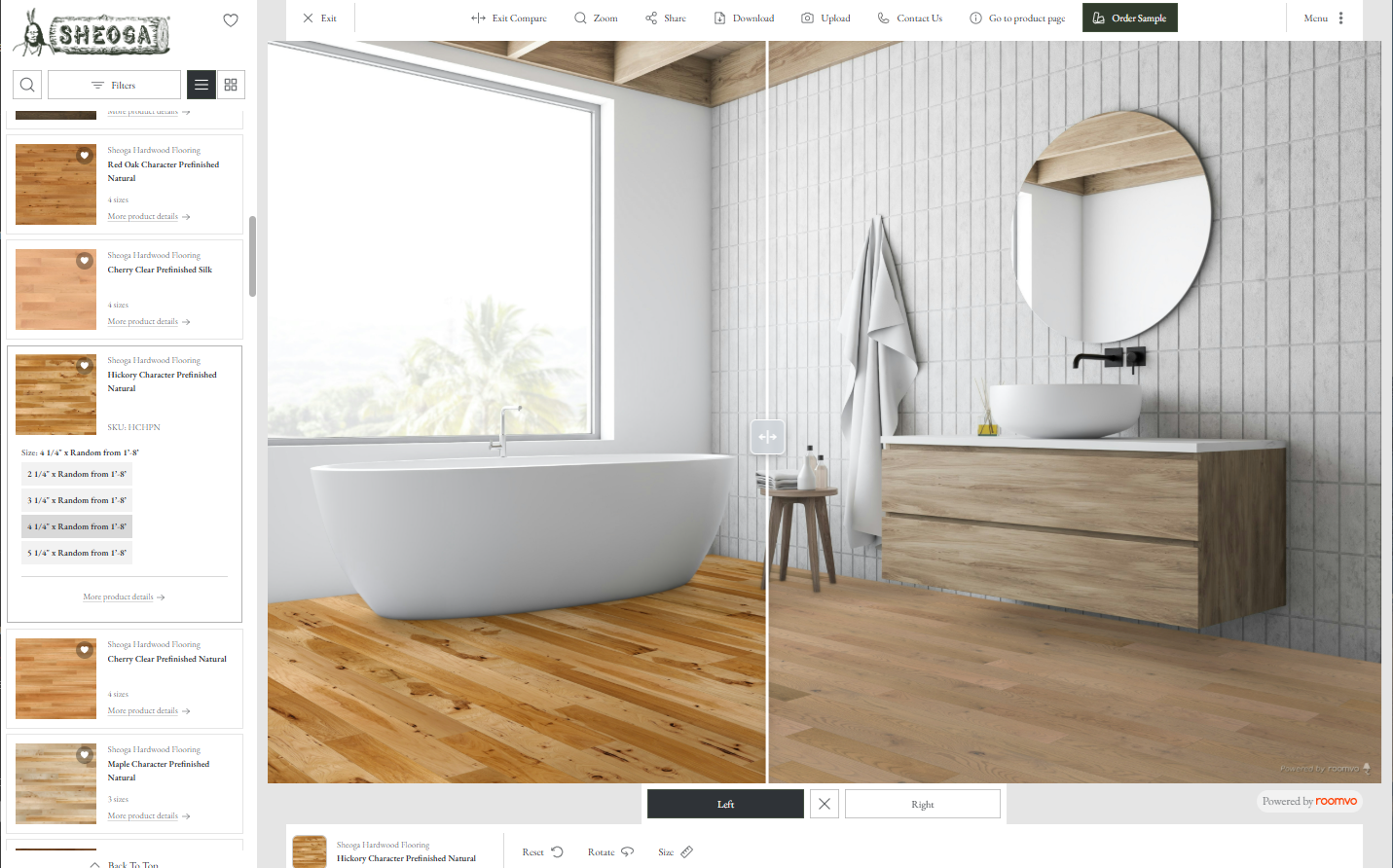
Roomvo – Room Visualizer 2025

What Is the Roomvo Visualizer?

The Roomvo Visualizer is an interactive design tool that allows you to digitally place Sheoga Hardwood Flooring into a room scene. It’s designed to help homeowners, designers, and builders visualize real hardwood floors—without guessing.

You can:

  • View flooring in a variety of room styles

  • Upload a photo of your own room

  • Try multiple species, widths, and finishes

  • Compare flooring options side by side

  • Use the tool on both desktop and mobile devices

Step-by-Step Guide – How to Use the Roomvo Visualizer

Step 1: Launch the Roomvo Visualizer

Click any “Visualize This Floor” or “Launch Visualizer” button across our website to open the Roomvo Visualizer.

You can find a “Launch Visualizer” button at the bottom of this page.

Step 2: Choose a Room or Upload Your Own Photo

You can start in two ways:

  • Select from preloaded room scenes

  • Upload a photo of your own space to see flooring in your actual room

Uploading your own photo gives you the most accurate preview of lighting, layout, and style.

Step 3: Select Your Flooring

Browse Sheoga Hardwood Flooring options by:

  • Species (White Oak, Hickory, Maple, Cherry, Walnut, Red Oak, Beech, and more)

  • Unfinished or Prefinished options

  • Available widths and grades

Currently, you can visualize about 40 of our 75 available flooring options, with more being added.

Step 4: Change Plank Widths & Direction

Roomvo allows you to:

  • View multiple plank widths for the same floor

  • Rotate flooring direction in four different orientations

This is especially helpful for understanding how plank layout can change the look and feel of a space.

Step 5: Compare Two Flooring Options

Use the Compare feature to view two flooring styles side by side in the same room. This makes it easier to narrow down choices between similar species, finishes, or widths.


Step 6: Save, Share, or Revisit Your Designs

You can save your favorite flooring looks or share them with:

  • Family members

  • Designers

  • Builders or flooring professionals

This makes collaboration and decision-making easier.

Explore Key Roomvo Features

Visualize Real Hardwood Flooring

Every option shown in Roomvo represents real Sheoga hardwood flooring—manufactured in Middlefield, Ohio—so what you see is grounded in real product options.

View Multiple Species & Finishes

Easily switch between species and finishes to see how color, grain, and character impact your space.

Unfinished & Prefinished Options

Whether you’re planning a custom on-site finish or looking for a prefinished solution, Roomvo helps you visualize both.

Mobile & Desktop Friendly

Use the Roomvo Visualizer on:

  • Desktop computers

  • Tablets

  • Mobile phones

Design and compare flooring anywhere, anytime.

Why Use the Roomvo Visualizer Before Choosing Flooring?

  • Reduces guesswork


  • Helps narrow choices faster


  • Visualizes flooring in your own lighting and layout


  • Improves confidence before ordering samples or material

Start Visualizing Your Hardwood Floors Today

The best way to choose hardwood flooring is to see it in your space. Use the Roomvo Visualizer to explore Sheoga Hardwood Flooring options and find the look that feels right for your home or project.

Launch Visualizer